Blog, Hunter's Effects, Recommended Gear

RP Tip #13: When All Else Fails, Call Digitech

I own a lot of RP hardware, and sometimes it does surprising things. Like, for example, I discovered last week that I can’t save a patch on the RP355 to any location besides preset #1 when said patch includes an LFO that modulates pitch shift with a square wave. (Don’t ask.)

When I’m stumped about what’s going on with my RPs, I email Digitech customer support. And when I do, I get help. I have never had to wait more than 24 hours for a response (except on weekends, of course), and the responses are always to the point and helpful. Furthermore, when the first response doesn’t do the trick, I email them again, and the second time around they respond within minutes, not hours.

This is good customer support by anybody’s standards, and RP owners should know that Digitech stands behind the stuff they make. So when you have a problem with your RP, don’t hesitate to go to Digitech.com and ask for help.

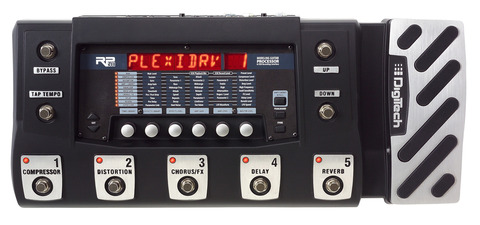
Digitech RP355
DigiTech RP355 Guitar Multi-Effects Pedal with USB

Blog, Hunter's Effects, Recommended Gear

Huntersounds Digitech RP150/155 patch sets coming soon!

Good news for harp players looking for bargain delay, reverb, and amp modeling FX: I’m working now on patch sets for the Digitech RP150/155. I’m converting some of my best patches for the Digitech RP250/255/350/355 for this purpose, so the first Huntersounds RP150/155 release will take advantage of everything I’ve learned on the higher-end RPs.

img_6749-ph-3-splatter-deeper-redpink-cut-out-winner-half-size

The RP150/155 devices are not as flexible and FX-loaded as the RP255/355, and they completely lack a footpedal, so they can’t be taken to the same limits as their big brothers. Accordingly, I’m going to focus these sets on the bread-and-butter needs of blues, rock, and country harp players, with amp-modeled patches using the most frequently-requested FX, such as octave doubling and rotary speaker (Leslie), plus a variety of delay and reverb patches for those folks who think a topnotch reverb + delay box for less than $100 is a great deal in itself. (The RP150/155 contains almost all the delays, and ALL the reverbs, found in the higher-end RPs, and you can use both delay and reverb at the same time. Not bad for under $100.)

These sets will retail for $25, and I expect them to be available through Coast2Coastmusic.com as well as my website at http://hunterharp.com. Stay tuned for more information. In the meantime, read what people are saying about our patch sets for the Digitech RP250/255/350/355.

Blog, Hunter's Effects, Recommended Gear

My first session with the Digitech RP255 as recording interface

Ed Abbiatti, the leader of the great Italian rock band Lowlands, asked me to play on several cuts on his upcoming CD, scheduled for release in early 2012. I did the first sessions in my home studio, using a Line 6 UX2 audio interface and Line 6′s Amp Farm software to do the amp modeling. After Ed heard the tracks, he asked me to lay down a hook riff on one of the pieces too. The only problem was that the deadline was Jan. 21, and by that time I was in Idaho, far from my home recording setup.

Ed Abbiati, Richard Hunter

What I did have with me was the Digitech RP255. I’ve written previously about the fact that the RP devices function pretty well as audio interfaces, and this was the acid test. I set up the 255 with a tough Fender Bassman patch, plugged it into the computer via USB, and set to work.

I’ll cut to the chase: I was very happy with the sound of the tracks I laid down with the RP255, and Ed is too. Of course I couldn’t easily get EXACTLY the same sound on the RP that I got with the Line 6 software, so to make things easier for the mix engineer I re-recorded the entire part, not just the new hook riff. The RP did its job both as an amp modeler and as an audio interface; my audio recording software (Cakewalk Sonar 8.5) was very happy with the RP from the start, and the recording process was utterly glitch-free. It’s even more impressive when you consider how finicky my laptop is when it comes to recording; most of the interfaces I own just can’t operate with the low latency that’s needed for recording against a guide track, but the RP cruised right along.

I don’t think the RP is going to be my go-to computer audio interface, at least not in the immediate future, but it’s nice to know that I can make usable tracks with it when I need to. I’ll ask Ed if I can post a snippet or two of the tracks for all to hear. In the meantime, if you’ve got an RP, you’ve got a decent computer audio recording interface.

Digitech RP355
DigiTech RP355 Guitar Multi-Effects Pedal with USB

Blog, Hunter's Effects, Recommended Gear

Gear Review: Tech 21 Blonde v2 Fender Amp Modeling Pedal

The Tech 21 Blonde (v2 in this case) is a stompbox amp modeling pedal designed to emulate a range of Fender amps, a role that it fills very well. It’s one of a series of “Character” pedals from Tech 21, whose experience building analog amp modeling pedals goes back to the original SansAmp a decade or so ago. Each of the “Character” series pedals is designed to emulate characteristic amp sounds for a particular manufacturer (such as Fender in the case of the Blonde, Vox, Mesa Boogie, etc.). Harmonica players have traditionally favored Fender amps for amped blues, so the Blonde is the likeliest pedal in the series to appeal to blues harp players.

At $169 retail, the Blonde is at the high end for pricing compared to single-amp-model competitors such as the Boss FBM-1 Bassman pedal and FDR-1 Deluxe Reverb pedal, but it’s also better-sounding and more versatile. Its controls are simple and effective, it’s practically noiseless in operation, and it runs on a 9 volt battery (or DC power with an optional adapter), which makes it fully portable and convenient for use at jam sessions and other situations where setup time is short. What’s not to like, aside from the fact that it doesn’t have any built-in FX?

Tech 21 Blonde v2

The blonde covers the basics without fuss or frills

As you can see from the picture, the Blonde’s controls are few and to the point:

  • Level: sets the output volume for the pedal.
  • Mid, Low, and High: sets EQ. The Mid band is set to 1 kHz, which is a good low-midrange zone for harmonica.
  • Drive: equivalent to the Gain control on a typical amp, this overdrives the preamp (or preamp modeling, in this case) for a grittier sound.
  • Character: this control has no equivalent on any other modeling pedal I’ve seen. Essentially, it shifts the tone in ways that mimic the characteristics of different Fender amps, from a Deluxe Reverb to a Bassman. My guess is that it adds modeled preamp and/or power amp tubes to the signal path as the knob is cranked up.
  • The Blonde has no reverb or delay. If you’re running the device through a PA or keyboard amp with either of these FX, you can use the effects in the amp (assuming you can get near the PA and understand quickly enough how to set the reverb/delay level for the harp, no easy trick at a lot of jam sessions). Regardless of whether you have FX available in your amp, you really should run the Blonde to a clean amp like a PA or a keyboard amp, not a traditional blues harp tube amp.

    In Use: Fender in a box

    Tech 21 helpfully supplies illustrations of a few useful knob settings, and I found the recommended Bassman setup to work well for harmonica without any adjustment. I tried a few variations on settings for Level, Drive, and Character, and found that I could get a range of usable tones, including some pretty hard-edged sounds. As usual for any amp modeler (or amp), changing any one of these controls demanded changes in the others too to avoid feedback and maximize tone. Speaking of feedback, the device will certainly howl if you push it hard, but it’s not especially feedback-prone. Bass response in particular seems very strong (in a good way).

    An unlabeled button on the front panel switches cabinet modeling (based on a 12″ Jensen setup) in and out. (By the way, what’s up with that no-label thing? A button as important as that ought to have something next to it that tells you what it does. Don’t be fooled by the picture above, which shows a small speaker symbol next to the button; I’m looking at my unit right now, and that symbol isn’t on it.) As usual for any amp, modeled or otherwise, without the cabinet the sound is plenty raw. If you like the sound of the cab you’re running the pedal through, that might be fine. I found that switching off cabinet modeling with the pedal connected to my Peavey KB-2 keyboard amp (with 10″ speaker) produced a big, barking tone that was similar to the bark of my Ron Holmes-modified Crate VC508 in side-by-side comparison. However, my guess is that running this device through a PA (or a powered PA speaker) without the cabinet modeling on would sound a little too raw for most players and most songs.

    The Blonde won’t turn on without a 1/4″ input plugged in, which is a good way to preserve battery life. I tested it with both the Fireball V and Bottle o’ Blues mics plugged straight into the input, and it produced big, meaty, tough tones with both.

    Value for Money is Strong

    The Blonde’s competition in this price range includes both multiFX devices like the Digitech RP255 and the Zoom G2NU, as well as the aforementioned Boss FBM-1 and DRM-1 pedals. The Blonde is definitely a better buy than either of the Boss pedals, given that it’s more versatile and better-sounding than both of them. The RP’s wide range of good-sounding amp models (including clean models) and FX makes it more versatile than the Blonde–it’s hard to get bored with the RP–but the Blonde gets an edge in at least some situations because it runs on battery. I also found the Blonde’s Bassman sounds to be just a little tougher than the Digitech’s (and more detailed than the Zoom’s harder-edged Bassman model), though both put out a big sound that’s plenty responsive to the player. In terms of ease of use, the Blonde is a winner for sure (though the RP is easy enough to use when you add my patch set).

    Of course, the ease-of-use comparison isn’t quite fair. The Blonde basically does one thing, while a multiFX device might be doing ten things at once. With a multiFX device you need to do your setup before the show–you need to think through the sounds you want and put them where you can use them, ready to go. You can’t adjust everything at once when you’re onstage, any more than you could do it with a chain of ten “real” FX pedals. The beauty of it is that once a multiFX device is set up with the sounds you want, you can achieve amazing changes of tone instantly–much faster than you could by adjusting physical FX pedals one by one.

    I use a lot of different sounds and FX in my performances; almost everything I do with the looper includes a layer that has an octave doubler, a rotary speaker, or a vibrato, and I like having those sounds available in a single device. I wouldn’t replace my RP355 with the Blonde for most performances, but I’m glad to have the Blonde for straight blues gigs, jam sessions and other situations where I want absolutely minimum setup time and at least one great sound to go to.

    I recorded a few samples with the Blonde and the RP355 to highlight the similarities and differences in their sounds. Here’s the Blonde:
    Tech 21 Blonde with Fireball V mic into Peavey KB2

    And an amped-up sound on the RP355:
    RP355 Dark Blue Tweed with Fireball V mic into Peavey KB2

    Finally, just to show what a difference delay can make, here’s the RP355 running the RP355 Dark Blue Champ patch with delay engaged, again with the Fireball V mic:
    RP355 Dark Blue champ with delay engaged

    Summary: The Blonde is Harp-Friendly

    If all you want is a great Fender amp emulation, you want to keep things simple, and you’re ready to spend more for additional FX (starting with delay and reverb), this thing rocks. It does what it does very well, and it’s built to last. It’s basically like buying a good harp amp, with the same benefits and limitations (except that you can’t throw a harp amp into your knapsack to take it to the jam). Keep in mind that, as with any amp modeling device (and as previously noted), you should run the Blonde into a PA or other super-clean amp rather than a typical guitar or harp amp. Modeled amp distortion on top of tube amp distortion isn’t the best way to produce a usable sound, unless you’re playing harp for Nine Inch Nails.

    If you decide to get one of these devices and you don’t have a delay or reverb, check out this article on using the Digitech RP as a delay and reverb box. With my patch set, it’s easy and economical.

    Blog, Hunter's Effects, Recommended Gear

    Huntersounds RP250/255/350/355 patch set update released

    I’ve just shipped the latest updates to the Huntersounds patch sets for Digitech RP 250/255/350/355 to current subscribers. This set contains patches designed for vocalists as well as a couple of new amped blues harp patches. The RP is a surprisingly capable vocal processor, and RP owners who sing and play through the same mic especially should find a lot to like in this set.

    img_6749-ph-3-splatter-deeper2-redpink-cut-out-winner-half-size

    A couple of the update emails I sent to subscribers this morning bounced back to me. If you’re a current subscriber, please make sure to keep me up to date on your email address so I can send these updates. If you think you should’ve received this latest update and didn’t, please contact me ASAP.

    Thanks to all my subscribers for taking this journey into 21st century amped harmonica with me. If you’re not already using a Huntersounds patch set in your Digitech RP, check it out.

    Audio/Video, Blog, Hunter's Effects, Hunter's Music, Recommended Artists & Recordings, Recommended Gear, Recorded Performances (live and otherwise)

    Waka Waka Waka Waka: Sunset Sam

    “Cruisin’ (Sunset Sam)” was written by Michael Nesmith of the Monkees, who also wrote “Mary Mary,” which Paul Butterfield covered on his amazing record “East/West” in the late 1960s. The piece has a head-bobbing groove that I’ve loved since I first saw the video in the early 1980s.

    The lyrics to “Sunset Sam” (and the Nesmith video) have a surreal quality to them, which I’ve reflected in both the harp sounds and the vocal for this performance. The groove is serious, but the story is laughable. Hey, so what? Shake yer money maker, man, it’s only words. (Or as a poet friend of mine titled a collection of his works, “Only Worlds.”)

    The harmonica is processed through 3 Digitech RP devices. The first is an RP355 running one of my favorite auto-wah patches, which is what provides the guitarish funk between lyrics. The second is an RP350 running two different patches: a high octave double on the signature lick and the first solo section, and a slightly different auto-wah patch on the second solo section. Both devices are run through an RP255 running one of my vibrato patches, and the vocal is coming through an RP250 running one of my new vocal patches (which will be released to subscribers to my patch sets within the week). All of these sounds, of course, are contained in my patch sets for the the Digitech RP 250/255/350/355, which you can learn more about here.

    “Sunset Sam” is nutty, funky, and fun. You can hear my recording right here:
    Sunset Sam Performed live by Richard Hunter 28 October 2011

    For extra laughs, here’s the original Nesmith video that inspired all this loud, funky silliness. Dig.

    Audio/Video, Blog, Hunter's Effects, Hunter's Music, Recommended Artists & Recordings, Recommended Gear, Recorded Performances (live and otherwise)

    Big Noise: Mississippi Queen

    “Mississippi Queen” was recorded by Leslie West and Mountain in the 1960s. I always loved the original, and when amp modelers came along to give me all the grunt I could want, I made sure to develop an arrangement for it.

    This version is played and sung live with looper accompaniment, recorded live in stereo. It’s a good example of the rock-oriented material I’m working on now, and of how the Digitech RPs make the big sounds that make it work. The looper is running drums, bass, and a harmonica part played on one of my patches for the Digitech RP350, a Matchless amp model with a Digitech FX25 envelope filter model. I love the FX25 model on harp–it’s easier to control than the original, and it gives the harp a totally different character, like a wah wah guitar. Since there’s only one live and one recorded harp part, this music could be played live with only two harp players, which is something I’d like to try sometime.

    The live harmonica parts include the same FX25 patch running on the RP355, side by side with an RP350 running the Dark Blue Champ patch. I really like the way an autowah exaggerates every expressive move on the harp, and the Dark Blue Champ beefs it up. At the end of the chain, a Whammy patch on the RP255 shifts everything a whole step down under footpedal control. That’s how I get the slide guitar effect on the chords. I’m singing through an RP250 running one of my new vocal patches with a slapback delay. So that’s four RPs on the floor, three dedicated to harp, one to vocals. All of these sounds, of course, are found in my patch sets for the Digitech RP 250/255/350/355.

    Everything is amped through Peavey KB2 and Peavey KB/A100 keyboard amps. The latter has a lot more bass than the former, and the stereo amps make the modulation FX in particular come alive. I recorded live through a Zoom H4 positioned to point a mic at each of the keyboard amps from less than a foot away. I compressed and EQed the live recording to make it louder and clearer. Otherwise, there’s no editing.

    Mississippi Queen performed by Richard Hunter

    Just for extra fun, here’s a live video recording of Leslie West, Felix Pappalardi, and Corky Laing (a/k/a Mountain) playing this tune at Randall’s Island in 1970. The music starts at about 1:30. Rock n’ roll!

    Blog, Hunter's Effects, Recommended Gear

    RP Tip #12: dealing with zipper noise

    The RP250/255/350/355 and up allow you to assign the footpedal to any effect parameter you like, which gives you a lot of power to change the sound. (The RP155 doesn’t have a footpedal, though you can add one, which would make it about as expensive as a 255, so why not just buy the 255?) However, some FX parameters–like vibrato speed or depth–come with a side effect: modulating the effect parameter with the footpedal makes the RP put out “zipper noise”, the ugly sound of digital bits struggling to keep up.

    Digitech RP355
    DigiTech RP355 Guitar Multi-Effects Pedal with USB

    Some people might like that sound, and if you were doing some kind of grunge music (I’m thinking Stone Temple Pilots) there’s a chance that it would add to the mood. But most of the time it’s not very cool–it just sounds like the machine is eating itself.

    This isn’t the same as the weird pitch-shifting effects you get with some delay models when you work the delay time with the pedal. Those aren’t zipper noise–they’re a true-to-the-original aspect of the modeling. They’re doing what the original analog devices do when you turn the delay time control while an echo is playing.

    There’s a workaround for the zipper noise, and I’m using it more and more frequently. Instead of programming the pedal to control vibrato speed or depth, I set the speed and depth to what I want for the song, and then I set the pedal to act as an on-off switch. Pedal down is full on. Pedal back is full off.

    This denies you the coolness of controlling the depth or speed of the vibrato in real time, which can be amazingly emotional. But going to full on suddenly–and without zipper noise–has its own powerful coolness. It’s an instant state change. You have to notice it.

    I’m going to use this setup for a lot of the patches in my next major revision to my RP patch sets, which should be ready in a few months. Stay tuned.

    Blog, Hunter's Effects, Pro Tips & Techniques, Recommended Gear

    RP Tip #11: It’s a very good delay and reverb box

    Most people who own the Digitech RP250/255/350/355 don’t think of it as a delay and/or reverb device, but the fact is that both the delays and the reverbs in these RPs are really very good, better sounding than many dedicated devices and most amp modelers in their price range, and more versatile than practically any.

    All the RPs include delay models that sound good with blues harp, such as the analog and tape delay models, and more modern delay sounds like pingpong, modulated delay, and digital delay. The 350/355 include delays modeled on specific devices like the Boss DM-2 and the Maestro Echoplex (both of which are also widely used by harp players). All the delays sound very good in their own ways, and it’s enough variety to cover a wide range of styles and material.

    The main feature of a pro dedicated delay that the RPs lack is tap tempo. (The RP500 and RP1000 offer tap tempo.) However, the footpedal can be assigned to control any parameter of any effect, such as delay time (which is what tap tempo controls, useful for longer tempo-synced delays) or delay level (which is very useful for shorter slapback delays) or number of repeats. Putting the delay time under footpedal control solves the same problem as a tap tempo switch, which is how to sync the delay to the beat, in a different way. Using the footpedal in this way introduces certain artifacts into the sound (like weird, cool out-of-tune modulations) with some delay models; this is actually an example of the accuracy of the modeling, because that’s what the original devices that the models are based on do when you twist their knobs while playing.

    Digitech RP155
    DigiTech RP155 Guitar Multi Effects Pedal with USB

    The RPs are certainly competitive in terms of value for money as a dedicated delay box, given that an RP255 can be bought new for $125-150 (an RP355 for $175-200) and a used RP150 in good condition can be found for well under $50, and any of these will sound better in a wider range of styles than most dedicated delay pedals. They’ve all got a range of good reverbs too, and you can use reverb and the delay at the same time. You essentially get both for the price of one. The alternative–adding a separate reverb pedal to a dedicated delay pedal–would cost you from half again to twice what an RP costs.

    Hearing is believing. We’ve recorded samples of the delay and reverb-only patches from our RP150/155 patch set, and you can hear them here. We think they easily sound as good as any dedicated device in their price range.

    So the RPs are worth a try when you’re auditioning delay and/or reverb pedals. And if you decide to get an RP, consider adding our patch set, which includes a lot of delay- and reverb-only setups that work great in front of your amp.

    Blog, Recommended Gear

    If You’re Not Using Natural Minor Harps Yet, Why Not?

    A poster wrote to the Harp-l internet mailing list today to say that his band is doing a lot of stuff in A minor, he’s been playing these tunes in 3rd position on a G harp, and he’d like to try something else to freshen up his approach to these tunes. Several people wrote in to say that he ought to try 5th position (A minor on an F harp) or 4th position (A minor on a C harp). Those are certainly valid choices. However…

    Here’s what I wrote:

    4th position (A minor on a C harp) and 5th position (E minor on a C harp, A minor on an F harp) are alternatives that might work for you on standard harps. Both feature a flat 6th and minor 3rd. Both have significant limitations. In 5th position, you have to avoid the draw 5 reed, which is a flat 2nd–not very useful in most blues and trad styles–or substitute the overblow on blow 5. In 4th position, you can only get the tonic note in the lowest octave with a double bend on the draw 3 reed, which as everyone knows is tough to do perfectly in tune. A problem with both these positions is that the choices of chords are very limited.

    And here’s the big message:

    If you really want to buff up your minor tunes, I recommend that you get a Natural Minor harp or two. On A minor tunes you could play either a Lee Oskar NM in A (2nd position is A minor) or E (first position is A minor). (Lee Oskar names the NMs after the key in 2nd position.)

    Either of these will give you a much wider range of minor chords to work with, including minor 7th and 9th chords, and will also allow you to get a lot more mileage out of your 1st and 2nd position licks. So your bandmates will definitely hear a difference.

    I still hear harp players say silly stuff like “it’s cheating to use non-standard tunings,” notwithstanding the fact that Steve Baker, Brendan Power, Lee Oskar, and myself, to name only a few, none of whom are exactly slackers, have been using non-standard tunings for years.

    Any harp player who wishes to make life as difficult as possible for him or herself by avoiding inexpensive and simple solutions to common problems is of course welcome to do so. But my advice is to try a minor tuned harp. (And plenty of other non-standard tunings after that, maybe starting with a country tuned harp, one of my all time favorites.)

    I’ve actually seen one of these “non-standard tunings are cheating” guys advise novice players to avoid half the notes on the standard-tuned harp in order to make it “easier” to play in a minor key. Wow. That’s easy? Easy is having all the notes you need built right into the harp. Easy is having full chord voicings for multiple chords over a 3-octave range. Easy is not beating yourself up just to prove a point.

    That’s my story and I’m stickin’ to it.

    « Previous PageNext Page »